Littlelands Launch Day Notes
What shipped on November 16, 2026 — price, trailer, features, and where to go next.
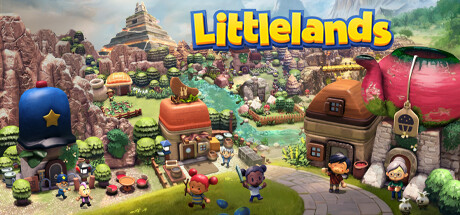
Littlelands launched into Steam Early Access on November 16, 2026. Developers Rafael Martín and Kyle Creamer (HyperMegaPixel) and publisher Apogee Entertainment marked the day with an Available Now trailer, a live store page for Windows (app 2083660), and a playable cozy-adventure foundation aimed at a full 1.0 exit in late 2027. This page is the launch-day snapshot: what you could buy, what was already in the build, how the free demo still helps, and which wiki guides to open first.
For the longer Early Access philosophy and feedback channels, read Early Access. For ongoing patch context, return to the Updates Hub.
Launch date and storefront
November 16, 2026 is the Early Access release date on Steam for Windows PC. The store listing presents Littlelands as a single-player cozy adventure with farming, fishing, insect catching, treasure digging, NPC stories, and approachable lock-on combat. English and Spanish ship at launch. Full controller support is listed, with a gamepad recommended, while mouse and keyboard remain fully supported with rebinding and optional camera auto-rotation.
Apogee’s Available Now trailer (embedded on this page) is the best short look at tone: claymation-like landscapes, big-headed characters, farm benches, ponds, and light adventure beats. Treat the trailer as mood and feature confirmation, then verify systems against Steam text and the guides linked below.
Price on launch day
Littlelands lists at $19.99. Launch carried a 10% introductory discount to $17.99, with the offer called out through roughly November 30, 2026. Always confirm the live Steam widget before you buy — regional pricing and sale calendars can differ, and wiki pages can lag a storefront change by a few hours.
The team has said they plan an introductory Early Access price while developing, and that they may raise the price as content expands toward 1.0, with advance notice. Buying during the launch window is a chance to lock in the intro rate if you already liked the demo; it is not a promise that $17.99 lasts forever.
What shipped on day one
Launch / post-demo Early Access content includes a complete cozy loop, not an empty vertical slice:
- Combat: lock-on targeting, circling, dodging; seven enemy types; Goblinettes; a Goblin Boss showcase fight
- Navigation QoL: minimap, Focus Glow for interactables and pickups
- Customization: hairstyles, eyes, facial cosmetics, clothes, hats, and more
- Life sim: restore a farm, grow berries, cook, decorate
- Gather loops: fish, catch insects, dig for treasure with the shovel
- World: six unique areas, caves and dungeons, shops, roughly twenty NPCs
- Comfort: rebindable controls, camera auto-rotation for mouse and keyboard, FPS cap in graphics settings
- Platform: Windows on Steam, single-player, modest minimum specs (Core i3 / 4 GB RAM / GTX 560 or HD 6970 class / 4 GB storage)
That package is why launch day felt like a real place to live in — with the honest Early Access caveat that exploration, combat, farming, and related systems will keep growing through late 2027.
Free demo still matters
The free demo — expanded for October 2026 Steam Next Fest and kept available after the fest — remains a ~two-hour fit check. It previewed character creation, six areas, shops, tools, twenty NPCs, and seven enemy types. Many launch improvements began as demo feedback: smoother lock-on combat, the Goblin Boss for testing the moveset, more cosmetics, the community-requested minimap, Focus Glow, rebinding, camera auto-rotation, and the FPS cap.
If you have not purchased yet, play the demo first. If you already own Early Access, the demo still explains why certain systems feel the way they do. Pair it with Getting Started so your first owned hour is not spent rediscovering the UI.
Day-one play order
- Create a look you like, then enable Focus Glow and the minimap.
- Confirm bindings on Controls — dodge, lock-on, and interact should feel obvious.
- Plant a berry batch before a long trail; see Farming.
- Dig treasure and learn one foe at a time via Combat.
- Spend scarce currency with Early Tools so week-one purchases build an engine, not clutter.
- Bookmark official destinations on the Links Hub for Steam news, Discord, and social.
Roadmap reminder
Launch day is the start of Early Access, not the finish line. The stated goal is to leave Early Access in late 2027 after adding content and refining systems. Expect iterative updates rather than a silent jump to 1.0. Habits on this wiki — plant before explore, shovel ready, one enemy locked at a time — are written to survive those iterations.
Feedback on and after launch
Official messaging invites players to speak up through Steam Discussions, Discord, and social channels including @Littlelands. Clear hardware notes, input method (desktop pad vs Deck vs keyboard), and reproduction steps help more than vague complaints. The team already showed they listen during the demo cycle; launch day is when that loop continues for owners.
Related wiki pages
- Early Access — pricing philosophy, late 2027 intent, feedback depth
- Updates Hub — changelog doorway as patches land
- Getting Started — first-hour habits
- Combat — lock-on, dodge, Goblin Boss mindset
- Farming — plant-before-explore loop
- Controls — rebinding, Focus Glow, FPS cap
- Early Tools — first-week tool priorities
- Links — official store and community destinations
Littlelands launched as a place you can farm, fish, dig, and optionally fight goblins in on day one. Use this page as the dated snapshot, then live in the world while it grows toward late 2027.
Frequently Asked Questions
Quick answers about farming, combat, exploration, and Early Access.
When did Littlelands launch into Early Access?
November 16, 2026 on Steam for Windows. Full release is targeted for late 2027.
What was the launch price and discount?
List price is $19.99. Launch offered 10% off to $17.99 into roughly November 30, 2026. Always verify the live Steam store widget.
What features shipped on launch day?
Farm, fish, bugs, treasure, six areas, about twenty NPCs, lock-on combat with a Goblin Boss showcase, customization, minimap, Focus Glow, rebinding, camera auto-rotation, and an FPS cap.
Is the free demo still useful after launch?
Yes. The ~two-hour demo remains a fit check and shows many systems that shaped the Early Access build after community feedback.
Where should I go after reading launch notes?
Open Early Access for roadmap depth, Getting Started for the first hour, Controls for bindings, and the Updates Hub when patches land.